

Generative AI & LLMs
Enterprise Search Software Buyer's Guide: Build, Buy, or Use a Search Service?
Written by Tehreem FatimaReviewed by Umaid Asim
Published 14 min read

Most enterprise search software buyer’s guides start with a vendor comparison. They rank platforms, list features, and stop there. That skips the decision that actually determines whether the project works. Should you buy a platform, build your own search infrastructure, or bring in a team to build and run it as a service?
This guide covers all three paths in depth. It walks through what each one actually costs in time and effort, and which teams get the most value from enterprise search and why. It also covers what to evaluate before you commit, and the warning signs that show up in a weak proposal no matter which path you choose.
What Is Enterprise Search?
Enterprise search software indexes an organization’s internal content: documents, wikis, tickets, code, and messages. It lets employees search all of it from one search bar instead of switching between a dozen tools. Unlike public web search, results respect the same permissions the source documents already have, so no one sees content they shouldn’tSource [1].
A real enterprise search system has three working parts. A connector layer crawls or syncs content from each source, a wiki, a ticketing system, a shared drive, and keeps that copy current as the source changes. An indexing layer processes that content into a searchable structure, which today usually means both a traditional text index and a vector index for meaning-based retrieval. A query layer takes a user’s search, retrieves candidate results from the index, filters them against that user’s actual permissions, and ranks what’s leftSource [1]. Skip or weaken any one of these three and the system either misses content it should find or shows content it shouldn’t.
The term is sometimes used narrowly, as enterprise file search, to mean indexing documents and files specifically rather than tickets, code, or chat history. The broader system described above is what most organizations actually need once they look past the first use case that prompted the project.
That permission check is not a minor detail. It’s the single feature that separates enterprise search from a general-purpose search box bolted onto a company wiki. It’s also where a surprising number of otherwise capable implementations fail quietly, showing someone a document they were never supposed to see. Enterprise search and knowledge management are closely linked for this reason. A knowledge base is only as useful as the access rules that decide who can actually find what’s in it.
Enterprise Search Use Cases by Team
The benefits of enterprise search vary a lot by who’s using it, and that’s worth mapping out before you evaluate any vendor or delivery model. A platform tuned for one team’s content and query patterns won’t automatically serve another team well.
- Support and customer success. Agents search past tickets, internal knowledge bases, and product documentation to answer a customer's question without escalating or guessing. The value here is speed and consistency: the same answer to the same question, regardless of which agent handles it.
- Engineering. Developers search code repositories, internal wikis, design documents, and past incident write-ups instead of interrupting a colleague or rebuilding something that already exists. Code and technical documentation both need retrieval that understands structure, not just keyword matching. That's one reason hybrid search matters more here than in simpler content sets.
- Sales. Reps search proposals, competitive intelligence, and CRM notes during or right before a call. Here, a slow or wrong answer can cost a deal, not just time.
- HR and legal. Staff search policies, contracts, and compliance material where permission enforcement isn't optional. Some documents are restricted to specific roles by design, and a search system that doesn't respect that isn't a convenience, it's a liability.

The common thread across all four is that the value shows up as time saved and consistency gained, not as a single dramatic result. That’s a useful gut check when a vendor or proposal leans on a specific, outsized number. Real enterprise search value tends to be steady and cumulative, not a one-time win.
How Enterprise Search Actually Works: Lexical, Semantic, and Hybrid Retrieval
Every enterprise search system runs on one of three retrieval approaches, and the difference matters more than most vendor pitches let on.
Lexical search matches exact terms using a relevance-scoring algorithm such as BM25. It’s precise and easy to explain: if a document contains the words in your query, it ranks higher. It struggles when the right document uses different words than the ones you searched for.
Semantic search retrieves results based on the similarity of meaning between a query and a document, using vector embeddings rather than exact word matchesSource [2]. It finds conceptually related content even when the wording is completely different. It can also introduce noise on ambiguous or very short queries.
Hybrid search runs both in parallel and merges the results into one ranked list. The most common fusion method is reciprocal rank fusion, which favors documents that rank well in both approachesSource [2]. This is what most serious enterprise search platforms actually run today, not lexical or semantic alone. It corrects for each approach’s weak spot without giving up either one’s strength. When people say intelligent enterprise search, this permission-aware, hybrid-retrieval combination is usually what they mean, not any single algorithm on its own.
The mechanics behind chunking, embedding, and indexing documents for semantic retrieval are the same mechanics that power retrieval-augmented generation. For a deeper technical walkthrough, chunking strategy, embedding model selection, and vector database options, see our guide on RAG architecture and retrieval quality.
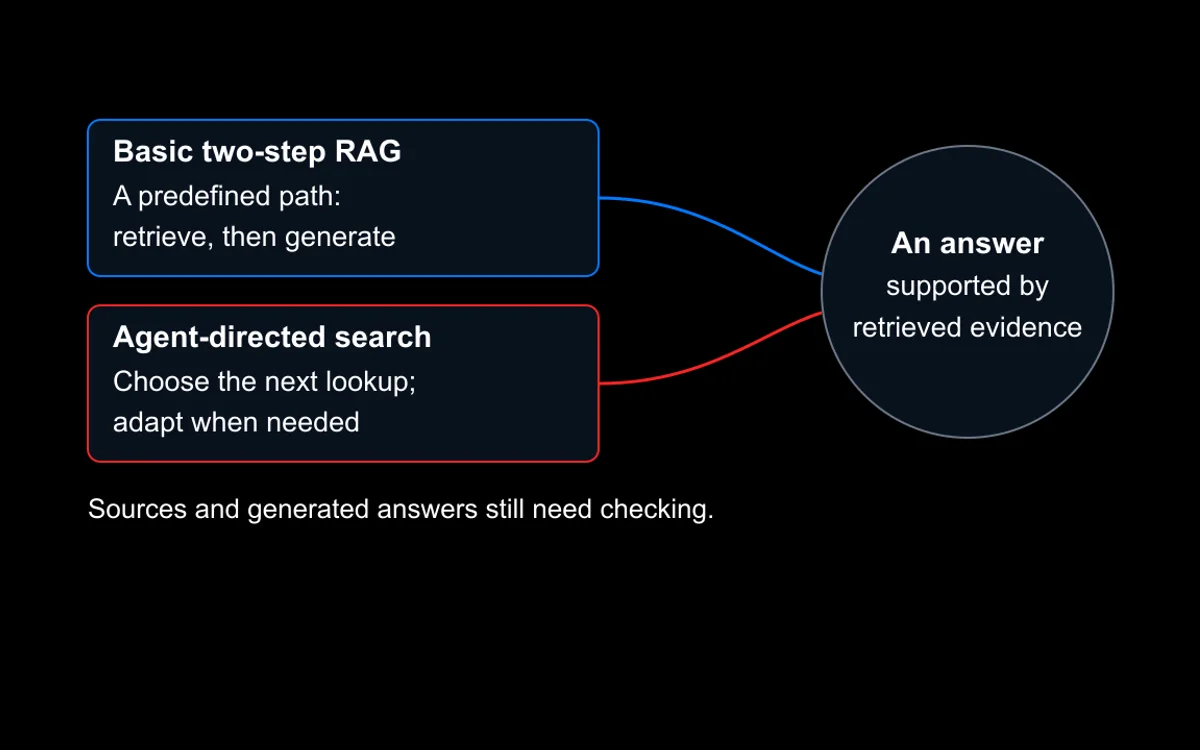
Some newer systems add an agentic layer on top of this retrieval stack. Instead of one fixed pass, a model plans multi-step searches and re-queries as needed. Our agentic search versus RAG piece breaks down when that added complexity is worth it for enterprise search specifically.
The Real Decision: Build, Buy, or Use a Search Service
Most competing guides frame this as a vendor comparison: which platform should you license? That question matters, but it comes second. The first question, and the actual foundation of your enterprise search strategy, is which delivery model fits your organization. There are three real answers. If you want structured help working through this specific call, SensViz’s AI business consulting covers build-versus-buy evaluation and feasibility assessment for AI initiatives generally, not just search.
Buying a Search Platform
A licensed platform, Elastic, Glean, Lucidworks, and similar tools, gets you a working product fastest. You still have to connect it to every content source you want searchable. You’ll also need to configure permission mapping so results respect existing access controls, and tune retrieval quality for your specific content. Licensing cost is ongoing and usually scales with users or data volume, and you’re dependent on the vendor’s roadmap for anything the platform doesn’t already support.
Building Custom Search Infrastructure
A custom build gives you full control over retrieval quality, ranking logic, and how deeply search integrates with your other systems. It also means owning every piece: document processing, embedding and indexing, retrieval tuning, access control, and the ongoing maintenance of all of it. This suits organizations with genuinely unusual requirements, real engineering capacity, or a strategic reason to own the infrastructure rather than rent it.
Using a Search-as-a-Service Engagement
A development team builds the system on your infrastructure, using open components rather than a proprietary licensed product. You end up owning it outright, with no per-seat licensing fee. This sits between the other two options. It’s faster than a from-scratch build, since a team with prior implementation experience isn’t solving already-solved problems. It’s also more tailored to your actual content and permissions than a one-size-fits-all platform. For a broader look at what a development engagement like this actually includes phase by phase, see what generative AI development services actually include.

None of the three delivery models is inherently better than the others. The right one depends on how standard your content and permission structure are, and how much engineering capacity you have to maintain a custom system. It also depends on whether ongoing licensing or a one-time build cost fits your budget better.
What to Evaluate Before You Commit
Whichever path you choose, get these specifics in writing before you sign anything. A proposal that’s vague on any of these hasn’t actually been thought through yet.
- Permission mapping. How does the system determine what a given user can see? Does that check happen on every query, or only when content is first indexed? A system that only checks at indexing time will keep showing documents to users whose access was later revoked.
- Connector coverage. Which content sources does it actually connect to out of the box, Slack, SharePoint, Google Drive, Confluence, your ticketing system? How is a new source added when it isn’t already supportedSource [4]?
- Retrieval quality. Does it run hybrid search, or lexical and semantic separately? Ask for a test against your own sample content, not a generic demo.
- Deployment speed. How long from kickoff to a working, permission-correct search experience across your priority content sources, not just one pilot source?
- Scalability. Does it hold up the way scalable enterprise search solutions for large teams need to, as content and query volume both grow with headcount? Ask specifically how response time and relevance get tested at that scale, not just at launch.
- Ongoing maintenance. Who re-indexes content as it changes? Who updates permission mappings when someone's access changes? Is that included in the price or billed separately?

Security, Permissions, and Governance
This is the part that gets the least attention in a sales conversation, and it causes the most damage when it’s wrong. A properly built system checks permissions at query time, not just when content is indexed. Every document’s access list gets checked against the requesting user’s identity and group memberships before that document is ever returned. A document the user isn’t authorized to see is excluded entirely, not shown with parts blacked outSource [3].
That distinction, checking at query time versus only at indexing time, is what keeps a system secure as your organization’s access rules change. If someone leaves a project or loses access to a system, a query-time check reflects that immediately. An indexing-time-only check keeps showing them what they used to have access to, sometimes for days, until the next full re-index.
Ask any vendor or development partner directly: does permission enforcement happen at query time? And what happens if the permission service is temporarily unavailable? A system that fails open, showing results anyway when it can’t verify permissions, is a real risk. One that fails closed, refusing to return anything until it can verify, is the safer default.
Implementation Timeline and Cost Factors
Implementation timelines vary enough by organization that a single number isn’t honest. A short list of concrete factors drives the real timeline and cost of an enterprise search implementation, not a fixed formula.
The number and variety of content sources you need connected is usually the biggest driver. A system searching one well-structured wiki is a different project than one searching fifteen scattered tools with inconsistent permissions. Data volume matters less than source variety for most mid-size deployments, but it becomes the dominant factor once you’re indexing millions of documents. Permission complexity adds real integration work too, flat access is simple, deeply nested group and project-level permissions is not, regardless of which delivery model you pick. And a system that generates answers from retrieved content, not just a ranked list of documents, adds a layer of work on top of retrieval. A generated answer needs its own accuracy checking, separate from whether the right documents were found in the first place.
A proposal that quotes a single flat number without breaking down which of these factors it assumed is one worth questioning, not trusting at face value.
Red Flags in an Enterprise Search Proposal

Watch for a proposal that talks about search relevance but never mentions permissions. Watch too for one that quotes a flat price without asking how many content sources and users you actually have. A promise of full deployment in days, no matter how many systems need connecting, is another one to question. A demo that only ever shows a small, clean sample dataset, rather than a test against your own messy, real content, is worth questioning as well. So is any pitch that treats “we use a vector database” as a complete answer for how retrieval quality gets tuned to your specific documents.
Frequently Asked Questions
Is Enterprise Search the Same as a Vector Database?
No. A vector database is one component that supports semantic search. Enterprise search is the full system: connectors, an index, permission enforcement, and ranking. A vector database alone has none of that connector or access-control infrastructure. For vector database selection specifically, Fossilite’s guide to choosing one for RAG and AI search (opens in a new tab) covers that narrower decision.
Do I Need Hybrid Search, or Is Semantic Search Enough?
Hybrid search is the safer default for most organizations. Semantic search alone can miss exact-match queries like product codes or ticket numbers, which lexical search handles precisely. Lexical search alone misses conceptually related content phrased differently. Combining both, as most serious platforms do today, covers more of what people actually search for.
How Long Does an Enterprise Search Implementation Usually Take?
It depends mainly on how many content sources need connecting and how complex your permission structure is, not on data volume alone. A single well-structured source with flat permissions can move fast. A dozen scattered systems with nested group permissions takes meaningfully longer, regardless of which delivery model you choose.
Which Team Should Drive an Enterprise Search Project?
No single team owns every requirement. IT or engineering typically owns the connectors, indexing, and permission mapping, since that’s infrastructure work. The teams who’ll actually use it daily, support, sales, or HR, should define what content needs to be searchable and how urgently. They know their own query patterns better than any vendor demo can show.
Where to Go From Here
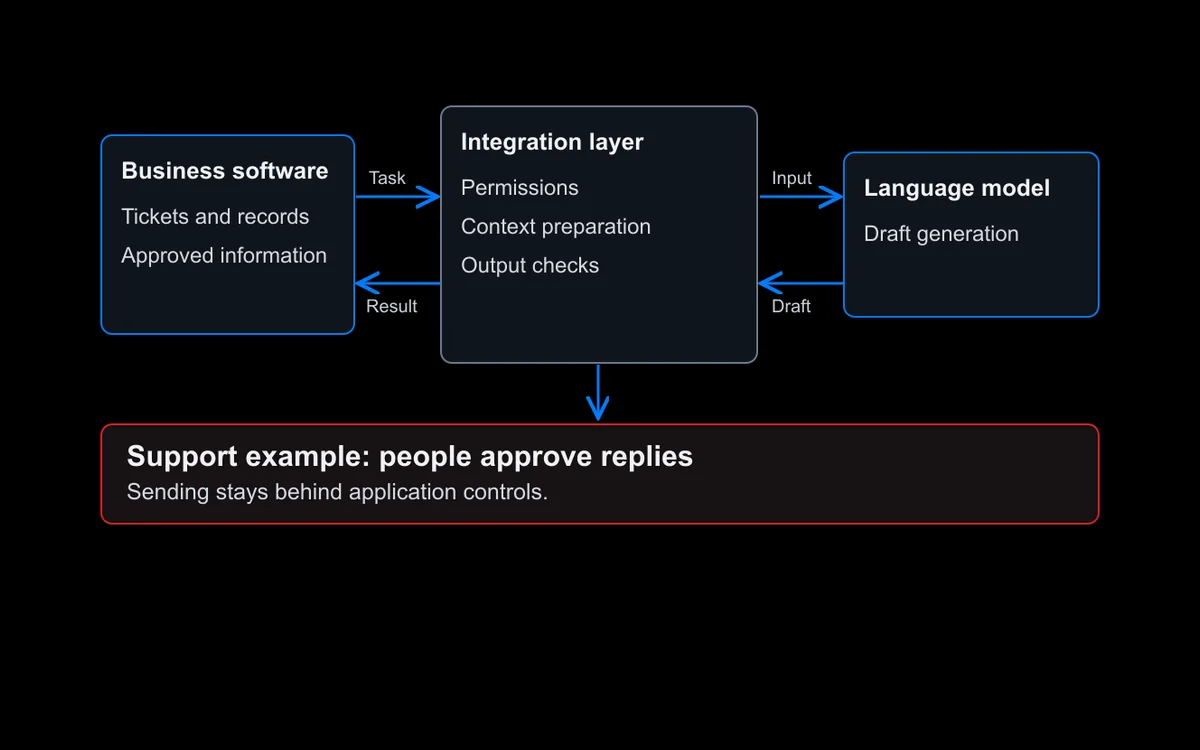
If you’re evaluating enterprise search for your organization, start by mapping your actual content sources and permission structure before talking to any vendor or development partner. That inventory alone will tell you more about which delivery model fits than any feature comparison will. From there, put the same question to each option: a licensed platform, an in-house build, or a service engagement. Ask it to answer the evaluation questions in this guide for your specific environment, not in the abstract. If organizational readiness is still the open question, our generative AI integration piece covers what to sort out before committing to any AI initiative, enterprise search included.
SensViz builds enterprise search as part of its generative AI and LLM solutions, including permission-aware retrieval and hybrid search tuned to your own content. Talk to us about your use case to see what a scoped proposal looks like for your specific systems.